‏إظهار الرسائل ذات التسميات Audio and Video. إظهار كافة الرسائل

الأحد، 15 ديسمبر 2013

Zoom Player Home FREE 8.7 Beta 28

Zoom Player Home FREE 8.7 Beta 28


Zoom Player is a very fast media player. Prior to Zoom Player, playing media files on the PC was either overly simplistic for the Power User or overly cryptic to the common user. Zoom Player tries to both simplify the playback experience for the common user, while giving the Power Users all the tools and interfaces they may require to manipulate their playback environment to their exact specification. To that end, Zoom Player employs a slick and simple user interface, combined with easy to access features while at the same time providing advanced control dialogs over every feature imaginable.
Zoom Player was designed from the ground up to load quick, take as little system resources as possible, provide user feedback/direction as appropriate and maintain as much isolation from other applications and system components as not to undermine overall stability.
Zoom Player Home remains Free for Non-Commercial use.


http://www.filehippo.com/download_zoom_player_home/download/1452818e10dbba095b43beaa1a1b28d8/
 

XBMC Media Center 12.2

XBMC Media Center 12.2


 XBMC is an award winning media center application for Linux, Mac OS X, Windows and XBox. The ultimate hub for all your media, XBMC is easy to use, looks slick, and has a large helpful community. Try it now!

Media Management
XBMC supports viewing and playing a vast library of audio, video and image formats. XBMC has a sophisticated library management system that allows you to organize all your media to give you quick and immediate access.

Fluid Interface
XBMC provides a user friendly interface that's intuitive, very flexible, and easy to use. The interface is completely customizable through user-created or downloadable skins.

Plug-ins and Extensibility
XBMC has a built-in Python interpreter that allows users and developers to write their own scripts and plugins that run inside XBMC using it's own widgets and controls. It also has a built-in web server that allows it to be controlled remotely.

Visualisations
XBMC's audio player supports many visualisations including ProjectM and Goom. In addition, it allows easy development of visualisations using a simple API.


http://www.filehippo.com/download_xbmc_media_center/download/c3166574fc9177f58a386c782ee67de7/


Wondershare Video Editor 3.1.6

Wondershare Video Editor 3.1.6


 Thanks to its intuitive UI, Wondershare Video Editor makes creating movies from videos taken via mobile phone, digital camera or camcorder an easy undertaking. After launching the program, the user can choose between two aspect ratios - 16:9 and 4:3. The workspace contains a file manager, a timeline and a preview pane. Once video, image and audio files are imported, they are moved onto the timeline for editing, where the options include trim, cut, split, rotate, set fade in and out, speed and more. To add a creative touch, Wondershare Video Editor offers a large number of effects and filters like comic or vintage styles, transitions and color corrections. Audio of the recording can be adjusted, muted or overlaid with music. Finalized movies are exported to variety of formats for portable devices or high-quality viewing, for example DVD. Online sharing is made easy with direct upload to video platforms such as YouTube.
Supported File Formats
Video: WMV, MOV, MP4, MTS, AVI, MKV, FLV, etc.
Audio: MP3, OGG, WAV, AC3, AAC, M4A, WMA, etc.
Images: JPG, GIF, PNG, BMP, etc.


http://www.filehippo.com/download_wondershare_video_editor/download/bcd1e92dc338e8ecdcb1d0deec286a43/

    Windows Media Player 11

    Windows Media Player 11


    Windows Media Player for Windows XP offers great new ways to store and enjoy all your music, video, pictures, and recorded TV. Play it, view it, and sync it to a portable device for enjoying on the go or even share with devices around your home, all from one place.
    • Simplicity In Design - Bring a whole new look to your digital entertainment.
    • More of the Music You Love - Breathe new life into your digital music experience.
    • All Your Entertainment in One Place - Store and enjoy all of your music, video, pictures, and recorded TV.
    • Enjoy Everywhere - Stay connected with your music, video, and pictures no matter where you are.


    http://www.filehippo.com/download_windows_media_player/download/216e667f9ad91a0e45ae2383a3beed1d/

    windows Live Movie Maker 16.4

    windows Live Movie Maker 16.4


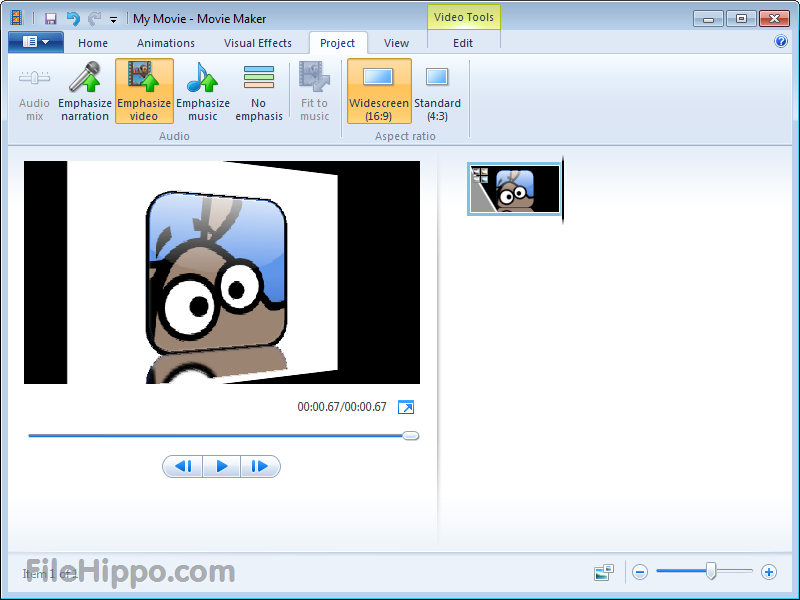
     Windows Live Movie Maker is designed for the budding videographer. Your very own movie studio at the tip of your fingers. Quickly import your footage from your computer or camera directly into Movie Maker and then easily edit, fine tune and personalize your movie just the way you want with professional editing options or pick from a customised theme. Add a music, titles and credits and choose from a variety of effects including transitions effects, animations, zoom, pan and visual effects. Once finished, share your video with your friends and family online on Facebook, Youtube, Twitter or any other social networking site or email them the link so they can enjoy your favourite digital memories as well. 


    http://www.filehippo.com/download_windows_live_movie_maker/download/288ea6134842fae82f0d5ef8ac3b4615/

    Windows 7 Codecs Advanced 4.3.8

    Windows 7 Codecs Advanced 4.3.8


     All the codecs you need for Windows 7 to play AVIs, DVDs and more!

    It does not contain a media player and it does not associate file-types. With the Windows 7 codec package installed you will be able to use any media player, limited only by the players' capabilities, to play all movies and video clips. Streaming video is supported in several formats in all popular web browsers. Users of the Windows 7 media center codecs have the ability to choose what is installed and where to install it using the public redistributable. After installation you can select to remove specific portions without removing the entire package. You can also re-add the removed items at any time.


    http://www.filehippo.com/download_windows_7_codecs/download/4449f6832514d0158652717e710dbc24/

    Winamp 5.666 Full Build 3516

    Winamp 5.666 Full Build 3516


    Winamp is a skinnable, multi-format media player.
    Winamp supports a wide variety of contemporary and specialized music file formats, including MIDI, MOD, MPEG-1 audio layers 1 and 2, AAC, M4A, FLAC, WAV, OGG Vorbis, and Windows Media Audio. It supports gapless playback for MP3 and AAC, and Replay Gain for volume leveling across tracks. In addition, Winamp can play and import music from audio CDs, optionally with CD-Text, and can also burn music to CDs. Winamp supports playback of Windows Media Video and Nullsoft Streaming Video, as well as most of the video formats supported by Windows Media Player. 5.1 Surround sound is supported where formats and decoders allow.
    Winamp supports many types of streaming media: Internet radio, Internet telelvision, XM Satellite Radio, AOL video, Singingfish content, podcasts, and RSS media feeds. It also has extendable support for portable media players, and users can access their media libraries anywhere via internet connections.
    You can extend Winamp's functionality through the use of plug-ins, which are available on the Winamp site.


    http://www.filehippo.com/download_winamp/download/53615cbb9e74d1d6454fc8085b9b5091/

    VLC Media Player 2.1.2 (64-bit)

    VLC Media Player 2.1.2 (64-bit)


    VLC media player is a highly portable multimedia player for various audio and video formats as well as DVDs, VCDs, and various streaming protocols without external codec or program.
    It can also be used as a server to stream in unicast or multicast in IPv4 or IPv6 on a high-bandwidth network.
    VLC can play:
    • MPEG-1, MPEG-2 and MPEG-4 / DivX files from a hard disk, a CD-ROM drive, and so on
    • DVDs, VCDs, and Audio CDs
    • From satellite cards (DVB-S)
    • Several types of network streams: UDP/RTP Unicast, UDP/RTP Multicast, HTTP, RTSP, MMS, etc.
    • From acquisition or encoding cards (on GNU/Linux and Windows only)
    VLC Media Player 64-bit is an experimental version of this program.


    http://www.filehippo.com/download_vlc_64/download/17774760ee3b0b9d329223ebf234494c/


    VLC Media Player 2.1.2 (32-bit)

    VLC Media Player 2.1.2 (32-bit)


    VLC media player is a highly portable multimedia player for various audio and video formats as well as DVDs, VCDs, and various streaming protocols without external codec or program.
    It can also be used as a server to stream in unicast or multicast in IPv4 or IPv6 on a high-bandwidth network.
    VLC can play:
    • MPEG-1, MPEG-2 and MPEG-4 / DivX files from a hard disk, a CD-ROM drive, and so on
    • DVDs, VCDs, and Audio CDs
    • From satellite cards (DVB-S)
    • Several types of network streams: UDP/RTP Unicast, UDP/RTP Multicast, HTTP, RTSP, MMS, etc.
    • From acquisition or encoding cards (on GNU/Linux and Windows only) 


    http://www.filehippo.com/download_vlc_32/download/effd0a9d3d0a18ea421393562459048b/


    Vista Codec Package 6.6.1

    Vista Codec Package 6.6.1


     All the codecs you need for Vista to play AVIs, DVDs and more!

    It does not contain a media player and it doesn't associates filetypes. With this package installed you will be able to use any media player, limited only by the players' capabilities, to play DVD's, movies and video clips of almost any filetype. Streaming video is supported in all popular web browsers. By default you won't need to make any adjustments to enjoy a variety of media content immediately. Users have the ability to choose what is installed using the public redistributable or after an unattended install, you can select to remove specific portions without removing the entire package. Future releases will recognize previous releases and are capable of performing upgrade installations.

    The Vista Codec Package is also compatible with all versions of Windows XP.


    http://www.filehippo.com/download_vista_codec_package/download/2da64b7ea9c1bfcbf428c5d9f1989b0f/


    VirtualDub 1.10.4

    VirtualDub 1.10.4


     Are you looking for a streamlined tool for capturing and processing videos? Well, VirtualDub is your choice.
    (Batch-)Process your AVI files, apply video filters and tune your codecs to gain high quality results.
    Capture Features:

    • Access all Video for Windows compatible devices.
    • Free frame rate definition.
    • Optimized disk access for more consistent hard disk usage.
    • Create AVI2 (OpenDML) files to break the AVI 2GB barrier.
    • Integrated volume meter and histogram for input level monitoring.
    • Real-time downsizing, noise reduction, and field swapping.
    • Verbose monitoring, including compression levels, CPU usage, and free disk space.
    • Access hidden video formats your capture card may support but not have a setting for, such as 352x480.
    • Keyboard and mouse shortcuts for faster operation.
    • Clean interface layout: caption, menu bar, info panel, status bar.
    • Processing Features:
    • Reads and writes AVI2 (OpenDML) and multi-segment AVI clips.
    • Remove and replace audio tracks without touching the video.
    • Extensive video filter set, including blur, sharpen, emboss, smooth, 3x3 convolution, flip, resize, rotate, brightness/contrast, levels, deinterlace, and threshold.
    • Bilinear and bicubic resampling.
    • Decompress and recompress both audio and video.
    • Remove segments of a video clip and save the rest without recompressing.
    • Adjust frame rate, decimate frames, and 3:2 pulldown removal.
    • Preview the results with live audio.
    • Queue and automate your jobs.


    http://www.filehippo.com/download_virtualdub/download/43edcafadbfcefe068eecf7dfaf8e212/

      VirtualDJ 7.4

      VirtualDJ 7.4


      VirtualDJ (VDJ) is a feature-packed deejaying software for mixing and playing digital audio and video tracks. The UI resembles a classic DJ setup with a mixer and two turntables but can be expanded to 4 decks or more. It’s vinyl emulation feature allows to control music files on the computer through physical turntables which makes the mixing and scratching experience authentic and far more powerful than using keyboard and mouse. VirtualDJ’s large range of features include standard controls (play, pause, stop, cue), automatic BPM and KEY calculation, a 3 band equalizer, pitch control, real scratch simulation, karaoke support, CD to MP3 encoder, compatibility with iTunes playlists, recording of DJ sessions and many more.


      http://www.filehippo.com/download_virtualdj/download/da1cd72543e2b4b08a93cff6f665e840/


      Tag&Rename 3.7

      Tag&Rename 3.7


      Tag&Rename is a Windows utility created to manage a wide range of popular music formats. The tool allows for quick and easy editing of tag data, for example MP3 ID, Windows media and iTunes tags (see below for full list). Writing new or updating existing tag data can be done for a single file or in batch for an entire album or folder. Tags are created based on file names or data downloaded from various music databases and song directories including freedb, tracktype.org and Amazon. The tagging software supports a long list of fields: title, artist, album, genre, year, disc number, cover art, lyrics, composer, conductor and more. Tag&Rename’s additional features include a powerful playlist editor with support for recursive subfolders and an advanced file list to show music files in a real folder structure.
      File and tag formats supported by Tag&Rename:
      • .mp3 - ID3v1, ID3v1.1, ID3v2.2, ID3v2.3 and ID3v2.4 tags
      • .wma, .asf and .wmv (Windows Media) - Windows Media tags
      • .m4a, .m4b (Apple iTunes aac and lossless audio files), .m4p (protected files from Apple Music Store), .mp4 - iTunes tags
      • .ogg, .flac and .spx - Vorbis Comments
      • .mpc (MusePack), .ape (Monkey's Audio), .ofr (Optim Frog), .wv (Wav Pack) and .tta (True Audio) - APEv1 and APEv2 tags
      • .wav – ID3v2 tag in 'id3 ' RIFF chank


      http://www.filehippo.com/download_tag_and_rename/download/070a4221f6e7780b3d7a83894b2ebc60/

      SUPER v2013 build 58

      SUPER v2013 build 58


      SUPER is an easy-to-use Multimedia Encoder and Player, requiring only one simple click.
      If you need a simple, yet very efficient tool to convert or play any Multimedia file, without reading manuals or spending long hours training, then SUPER is all you need.
      SUPER supports any Multimedia file format. SUPER plays files that cannot be played with WMP or even other libavcodec-based players like MPC and VLC. SUPER also plays and saves Internet Media Streams of different protocols (mms://, rtsp://, and http://).
      SUPER is the fastest and simplest tool to encode full-length movies to any other format without any time or function limitation. It does NOT require any additional external codecs. They're all built in!


      http://www.filehippo.com/download_super/download/0ef783fb4c1ddf9dbc494b271024156b/

      Spotify 0.9.6.81

      Spotify 0.9.6.81


      With Spotify, it’s easy to find the right music for every moment – on your phone, your computer, your tablet and more.
      There are millions of tracks on Spotify. So whether you’re working out, partying or relaxing, the right music is always at your fingertips. Choose what you want to listen to, or let Spotify surprise you.
      You can also browse through the music collections of friends, artists and celebrities, or create a radio station and just sit back.
      Soundtrack your life with Spotify. Subscribe or listen for free.


      http://www.filehippo.com/download_spotify/download/ff57d15f1523abb4296d3a70bcc4cd23/


      SopCast 3.8.3

      SopCast 3.8.3


      opCast is free tool to watch TV and video, and listen to music and other audio streams on your PC. The software is also configurable as a broadcaster to deliver your own content to an online audience via P2P. Using your home computer with a broadband connection you can stream your video and audio to thousands of people. Many TV stations and Video-on-Demand services are accessible through the Web. Some channels are pre-defined but the Internet holds thousands more that broadcast live and on-demand content like sports, documentaries, TV shows and news from dozens of countries. To watch them SopCast uses Windows Media Player by default but allows to connect other media players like VLC or Miro. Channels can be recorded for later watching either immediately or after setting a one-off or repeated timer.
      Supported Streaming Formats: ASF, WMV, RM, RMVB, MP3, SPL


      http://www.filehippo.com/download_sopcast/download/83e1ad49b95d63a1f16a124e22787c82/

      Songbird 2.2.0

      Songbird 2.2.0


      Songbird is an open-source customizable music player that's under active development.
      It is integrated with these Web 2.0 services: mashTape, SHOUTcast Radio, Last.fm Scrobbling, and Songkick concert tickets. You can enhance Songbird with community-contributed plugins like Media Flow.
      Features include:
      • GStreamer
      • Smart Playlists
      • Built-In Web Browser
      • Multi-language Support
      • Automatic Updates
      • Setup Assistant
      • Custom User Interface
      • Library Management
      • Developer Support
      Beta features include portable device support, metadata management, album artwork, and subscriptions.


      http://www.filehippo.com/download_songbird/download/265c66808ea3a93a23e7b9c428bb21e8/

      SMPlayer 0.8.6

      SMPlayer 0.8.6


      SMPlayer is a front-end for the mighty open source MPlayer. It comprises basic features like playing videos, DVDs, and VCDs to more advanced features like support for MPlayer filters and more.
      One of the most interesting features of SMPlayer: it remembers the settings of all files you play. So you start to watch a movie but you have to leave... don't worry, when you open that movie again it will resume at the same point you left it, and with the same settings: audio track, subtitles, volume...
      But there are even more interesting features:
      • Configurable subtitles. You can choose font and size, and even colors for the subtitles.
      • Audio track switching. You can choose the audio track you want to listen. Works with avi and mkv. And of course with DVDs.
      • Seeking by mouse wheel. You can use your mouse wheel to go forward or backward in the video.
      • Video equalizer, allows you to adjust the brightness, contrast, hue, saturation and gamma of the video image.
      • Multiple speed playback. You can play at 2X, 4X... and even in slow motion.
      • Filters. Several filters are available: deinterlace, postprocessing, denoise... and even a karaoke filter (voice removal).
      • Audio and subtitles delay adjustment. Allows you to sync audio and subtitles.
      • Advanced options, such as selecting a demuxer or video & audio codecs.
      • Playlist. Allows you to enqueue several files to be played one after each other. Autorepeat and shuffle supported too.
      • Preferences dialog. You can easily configure every option of SMPlayer by using a nice preferences dialog.
      • Possibility to search automatically for subtitles in opensubtitles.org.
      • Translations: currently SMPlayer is translated into more than 20 languages, including Spanish, German, French, Italian, Russian, Chinese, Japanese....
      A little bonus tool in the SMPlayer package is the "YouTube(TM) Browser for SMPlayer" providing you with a quick access to the most popular, most viewed and most rated videos on YouTube.


      http://www.filehippo.com/download_smplayer/download/d5d419397dfbab66f05835ea457ca1d0/

      RealPlayer 16.0.3.51

      RealPlayer 16.0.3.51


      RealPlayer has always enabled you to play RealAudio (*.ra) and RealMedia (*.ram) files.
      • Download videos from thousands of Web sites with just one click
      • Build your own video library and playlists
      • Play all major audio and video formats
      • Flash Video support
      • DVD, SVCD, VCD burning and video recording
      RealPlayer for personal use includes audio CD burning capabilities, DVR-style playback buffering, multimedia search, Internet radio, a jukebox-style file library, an embedded web browser (using Microsoft Internet Explorer), and the ability to transfer media to a number of portable devices, including Apple's iPod, MP3 players, and Windows Media devices.


      http://www.filehippo.com/download_realplayer/download/9b931239de41b8dce664656f25e1c28b/

      Real Alternative 2.02

      Real Alternative 2.02


      Real Alternative allows your system to play Real Media files (.ra .ram) without having to install the full version of RealPlayer The latest version contains:
      • Media Player Classic - a freeware media player that supports both Real Alternative and QuickTime Alternative.
      • RealMedia Codecs
      • RealMedia plugin for Internet Explorer
      • RealMedia plugin for Opera/Mozilla/Netscape
      • RealMedia DirectShow splitter


      http://www.filehippo.com/download_real_alternative/download/95038e2e3247466158f6f4f80ad94a17/